No key.
Nothing to leak, rotate or bill.
Plug and play · automatic engine
One download, then unlimited offline replies in any UI. It picks the engine, manages the download, fits the prompt and reuses the cache. No key, no account, no server, no bill.
 In production at DoListy
MIT · Node 24 or newer · one download: 1.5 GB CPU, 2.0 GB GPU · no quotas
Why keep the model on the device?
No key, no upload. One download, then it picks the engine, fits the prompt and answers offline. The weights stay cached until you clear them.
Why local
A key, an account, a server, a signal, a bill. Local chat removes all five. The only thing left is the download.
Nothing to leak, rotate or bill.
The model is the backend.
Airplane mode is a supported state.
Live demo
The first reply downloads the model once. Then turn off Wi-Fi and keep chatting. The answer is generated in this tab.
This is the instruction the demo sends before your question. Edit it and watch the answer change.
Ask something. The first reply downloads the model once, then answers locally.
Idle. No model loaded.
First send downloads the weights once. About 1.5 GB on CPU or 2.0 GB on GPU. They stay cached and later replies run offline.
What you get
Plug and play: the engine, the download, the context window and the cache are the package's job. Bring any UI; your messages, markup and styles stay yours.
WebGPU runs the Gemma 4 E2B build. Without an adapter, the same call falls back to the CPU build. You never branch, detect or configure.
About 1.5 GB on CPU or 2.0 GB on GPU. It resumes after a reload, stays cached until you clear it, and then every token is generated on the device.
No key to leak and no server to trust. The image, the prompt and the reply stay in the tab, the worker or the Node process. The package writes no history.
Text arrives through callbacks, so React, Svelte, a worker or a terminal render the same reply. Cancel is one call.
Describe a photo, translate the description, build tags or turn a voice note into a task. Vision ships in the CPU build with no second download.
Engine choice, context limits, download resume, cache reuse and timeouts are handled. You pass messages and render text.
First run
One download, one cache, no server round trip. Every reply after the first is local, offline and unlimited.
npm install @degreesign/chat, then
call createChat. No key, no
account, no config.
The first send fetches the weights and resumes if the connection drops. 1.5 GB on CPU, 2.0 GB on GPU.
Every later send runs on the device. Stream tokens, stop any time, keep the model warm. There is no reply quota.
Proof
DoListy
A no-signup PWA for photos, voice notes and tasks.
It captions photos, fills tags and answers questions
with no account and no key. The chat is
@degreesign/chat.
describeImage.
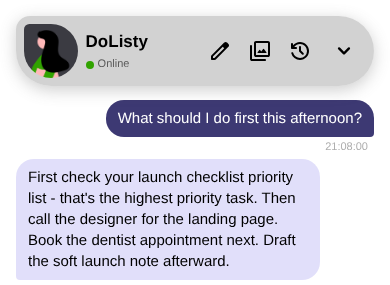
The network is off. The reply still arrives.
Models
With no override, the package picks the GPU build when WebGPU exists and the CPU build when it does not. Both are 2B models: small enough for a device, good enough for captions, tags and short answers.
The default on a CPU. Vision travels with the model, so image turns work without a second download.
| Build | Reasoning | Images | Weights |
|---|---|---|---|
qwen3_vl_2b |
Yes | Yes | about 1.5 GB |
qwen3_vl_2b_instruct |
No | Yes | Q4_K_M |
qwen3_vl_2b_instruct_q3 |
No | Yes | Q3, 160 MB less |
4K token context on a phone, 8K on a desktop. The projector shares the text thread budget.
The default on a GPU. A 2.0 GB build with a large context for text turns.
| Build | Reasoning | Images | Weights |
|---|---|---|---|
gemma4_e2b_limited |
Yes | No | 2.0 GB |
16K token context on a phone, 32K on a desktop. The build ships without vision or audio encoders.
These are 2B models. They are excellent at captions, tags, summaries, short answers and private drafts. They are not the model you ask to write a novel. The first reply on a phone can take a minute. After that, it is local.
Compared
Both packages can run the same Gemma 4 model right in the browser. The difference is what each one asks of the device and of you: the download, how much of the conversation it remembers, and the setup needed to ship. Here is the practical comparison.
2.0 GB
2.8 GB
Same base model, 800 MB less before the first token.
32K
4K
16K on a phone. web-llm caps both at 4K.
86.2 KB
6.8 MB
Minified. The web-llm entry is 6.2 MB after minification.
| Question | @degreesign/chat | @mlc-ai/web-llm |
|---|---|---|
| Smallest usable chat build | Gemma 4 E2B, 2.0 GB | 2.8 GB, smaller builds not usable |
| GPU context | 32K desktop, 16K mobile | 4K |
| Engine and model choice | automatic | host builds it |
| Browser entry | 86.2 KB minified | 6.8 MB, 6.2 MB minified |
| Package without wasm | 1.7 MB, wasm in package | 14.4 MB, wasm at load |
The honest verdict.
Choose @degreesign/chat for
plug-and-play chat on mobile PWAs, phones and consumer
web apps. Choose @mlc-ai/web-llm for
manual, desktop-only setups tuned for
shader-f16 GPUs.
Architecture
Every function is on one offline HTML page: the entry, the catalog, the prompt budgets, both engines and the stores. Read it before you ship it.
Opens in a new tab. One self-contained HTML file. Browse the source .
Install
No key, no account, no server. Add the package, call
createChat, render in any UI. Works in
React, a worker, a Node script or plain JS.
npm install @degreesign/chat
No config, no key. The first call downloads the weights once; later calls reuse the cache.
import {
    LlmRole,
    createChat,
} from "@degreesign/chat";

const cancel = createChat({
    messages: [
        {
            role: LlmRole.system,
            content: "Be brief.",
        },
        {
            role: LlmRole.user,
            content: "Hello",
        },
    ],
    onResponse: (text) => render(text),
    onStatus: (state) => show(state),
});

cancel();
FAQ
No jargon, no asterisks. Here is what it does and what it does not.
No. WebGPU is used when the browser has it. Without an adapter, the CPU engine runs the same call. Phones and older laptops work.
About 1.5 GB on CPU or 2.0 GB on GPU. It downloads once, resumes after a reload, and stays cached until you clear it.
Yes. After the first download, the weights and the engine run locally. The package makes no network request to answer.
The next send downloads it again. No hidden copy, no account.
The package is MIT and there is no per-reply fee. You pay for the device and the one-time download, not for each answer.
No key, no server and no upload. The package writes no history; your app owns the data.
Start here
One package. Two engines. Zero keys. Unlimited offline replies.
MIT · Types included · 1.5 GB CPU / 2.0 GB GPU